Not Every Great Photo Starts Out Perfect. AI Can Help Bring It Back to Life
The best photos are rarely the best-shot photos. The one that makes you smile years later was probably taken in a rush, in bad light, on whatever phone you happened to own at the time. The moment was perfect. The picture, less so.
It's grainy, or a little soft, or saved at a resolution that felt fine in 2011 and looks tiny now. Those images still matter, even when the quality doesn't quite match the memory.
That mismatch is a big part of why AI photo enhancement has caught on. Rather than learning a wall of editing sliders, people are reaching for tools that clean up a photo in a few taps and hand it back looking closer to how they remember it.
The Everyday Photos That Don't Quite Hold Up
Most camera rolls are a mix. Some shots look great. Plenty don't, and the reasons are ordinary rather than dramatic.
A portrait comes out blurry because someone moved. An old family photo was scanned at low resolution. A picture you loved got compressed into mush somewhere between a group chat and your download folder.
The usual suspects show up again and again:
Pixelation
Poor lighting
Camera shake
Softness from messaging-app compression
None of it makes a photo unusable. It just makes the photo less pleasant to look at, harder to print, and a little disappointing to share when you want it to shine.
The problem is ordinary, not dramatic
Nothing here ruins a photo. It just puts a small gap between the picture and the memory it belongs to.
Why Manual Editing Often Isn't the Answer
There's nothing wrong with traditional editing tools. The catch is that they assume some experience. Sharpening, noise reduction, color correction, and restoration each have their own logic, and getting them to work together takes practice.
Push any of them too far and the result looks worse than the original: crunchy edges, waxy skin, colors that drifted somewhere unnatural. For most people that's not the goal anyway. They aren't trying to produce a professional edit. They just want a cherished photo to look clearer and more presentable. When the effort of learning the tools outweighs the payoff, an automated option starts to look far more appealing.
One tap does the heavy lifting, and the result is meant to look natural rather than obviously edited.
What People Actually Want From an Enhancement Tool
The common thread is speed and simplicity. Most people would rather tap once than adjust a dozen settings, and they want the outcome to look natural rather than obviously edited.
A few capabilities tend to come up most often:
One-tap enhancement that does the heavy lifting
Sharper facial detail, since faces are usually the point
Restoration for older images that have faded
Automatic color adjustments, no color theory required
Cleaner backgrounds and support for video as well as stills
The appeal isn't power for its own sake. It's getting a better image without turning the process into a project.
A Few Things to Weigh First
Before settling on any AI enhancement tool, it helps to compare a handful of practical points rather than the marketing around them.
Look at which devices the tool supports and whether it covers the editing features you actually need. Check the subscription options, the quality of exported images, and whether video enhancement is included if that matters to you.
Processing speed and the tool's privacy practices are worth a look as well. The right choice comes down to the kinds of photos you work with most and what you want out of the finished result.
Results vary, and that's expected
How much an image improves depends on the quality of the original file and the type of enhancement applied. A reasonably good photo has more to work with than one that started out heavily damaged.
Who Tends to Get the Most From It
Remini suits people who care about how their images look but don't want to spend an evening editing them.
01
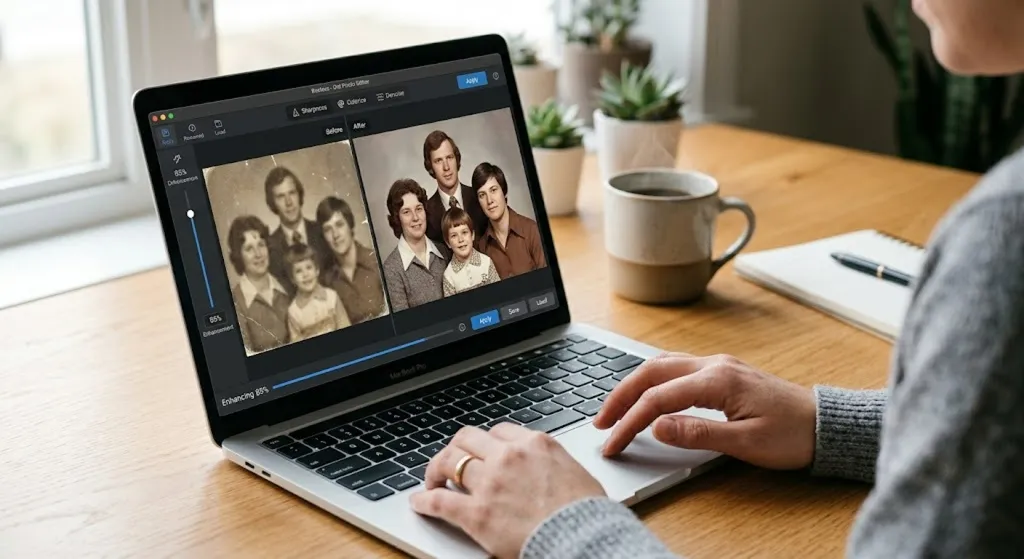
Families restoring old photographs
Faded prints and low-resolution scans are the clearest case. The aim is a clearer presentation, but AI enhancement can generate plausible detail that was not present in the source.
02
Content creators and social media users
For repeated image work, compare the number of manual steps, processing limits, and consistency of the output before choosing an automated tool.
03
Small business owners
Product and promotional shots rarely get a studio. A cleaner image is often the difference between usable and not.
04
Photographers wanting a quick fix
Not every frame deserves a full edit. Some just need to be clear enough to hand over.
05
Students preparing presentations
A sharper image in a slide deck reads as care taken, even when the source file was whatever turned up in a search.
06
Anyone who wants clearer digital memories
No particular skill or purpose required. The output may become easier to view, but it remains an AI-processed interpretation of the source image.
What AI Enhancement Cannot Confirm
Remini describes tools for sharpening, denoising, color adjustment, face enhancement, background enhancement, AI portraits, and supported video. These tools process the submitted media; they do not verify that newly visible or generated details are historically accurate.
Keep an untouched copy of important originals. Compare the processed output with the source before printing, publishing, identifying a person, or relying on a detail that was previously unclear.
Results depend on the source image and selected enhancement.
Faces, textures, colors, and backgrounds can be altered or generated.
Feature access, export limits, subscriptions, and supported formats can vary by platform and region.
A Closer Look at Remini
One tool built around that idea is Remini, an AI-powered photo and video enhancement platform that uses machine learning to improve image quality. A few of its capabilities are worth walking through individually.
Restoring older photos
Faded prints and low-resolution scans may appear clearer after processing, but AI can generate or alter plausible details. An enhanced result should not be treated as a historically exact reconstruction of the original scene.
Sharper portraits
Face Enhance technology focuses on improving facial detail while trying to keep a natural look, which tends to make portraits and selfies appear crisper without that plastic, over-processed feel.
Better backgrounds
Enhancement isn't limited to faces. Remini can refine the surrounding elements of an image too, helping landscapes, architecture, and other background detail look more defined.
Automatic color
Built-in AI can balance color and lift the overall appearance of a photo without asking you to understand what any of the adjustments are doing behind the scenes.
AI portraits
The platform also includes AI-generated portrait features that create stylized images from photos you upload. The specific options available may vary depending on the plan you choose.
Video as well as stills
Beyond photos, Remini offers tools designed to improve the quality of supported video, which makes it useful for a wider range of creative projects than image editing alone.
Before You Settle on a Tool
It helps to compare a handful of practical points rather than the marketing around them.
What the app brings
Automated enhancement
Machine learning designed to sharpen blurry shots, revive older images, bring out facial detail, refine color, and lift overall clarity.
Restoration for faded prints and low-resolution scans
Face Enhance for sharper, natural-looking portraits
Automatic color balancing with no color theory needed
AI portraits and video enhancement for supported media
Features, plan structures, device support and pricing are set by the provider and can change without notice. Confirm current details and regional availability with Remini directly before subscribing. Results vary: how much an image improves depends on the quality of the original file and the type of enhancement applied.
Privacy and Subscription Checks
Using an AI photo service requires uploading media for processing. Remini's current privacy information should be reviewed before submitting photographs, videos, or images containing faces, children, documents, or other sensitive material.
Confirm how the applicable web or mobile service handles uploaded media and face data, how long data is retained, how deletion requests work, and whether a trial or subscription renews automatically. Availability, pricing, advertising, credits, export quality, and video support may differ by platform and location.
Official Sources Checked
Feature and privacy descriptions were checked against provider materials on July 30, 2026. Remini and its operators, not this publisher, set current availability, processing practices, prices, and terms.
Remini is an AI-powered application designed to enhance photos and videos by improving clarity, restoring older images, sharpening facial detail, and applying automated enhancements.
Can it restore old photographs?
It includes AI restoration features aimed at improving older, blurry, scratched, or low-resolution photos. The outcome depends on the condition of the original image.
Does it only work on portraits?
No. Portrait enhancement is one of its popular features, but the platform can also improve landscapes, backgrounds, and other kinds of images.
Can Remini enhance videos?
Yes. Along with photo enhancement, it includes AI-powered video enhancement for supported media.
Do I need editing experience?
No. Remini is built to automate much of the process, so it stays accessible whether or not you've edited photos before.
Will every image look the same after enhancement?
No. The final look depends on the original image quality, the subject, the lighting, and the enhancement options you select.
Why not just edit the photo manually?
You can. Sharpening, noise reduction, color correction and restoration each have their own logic, and getting them to work together takes practice. When the effort of learning the tools outweighs the payoff, an automated option starts to look more appealing.
Give Your Photos a Fresh Look
Whether you're preserving family memories, working with older pictures, or processing everyday snapshots, Remini provides tools for supported photo and video enhancements. Results vary, and generated details may not be faithful to the original moment. Keep an untouched original and review Remini's current processing, privacy, platform, and subscription information before uploading media.
This page is a paid advertorial brought to you by datarixkey.com. It is intended for promotional purposes only and should not be considered independent journalism, editorial content, photography advice, creative guidance, or professional image editing services. The content has been created or curated by the advertiser and may include affiliate links. We may receive compensation if you purchase a featured product or service through links provided on this website. Please review our Advertising Disclaimer and Privacy Policy.